Recently updated on March 3rd, 2026 at 7:39 pm

I’ve been using the Yuka app for quite a while now and I wanted to share my honest thoughts.
A lot of people download Yuka because they want quick answers. You scan a product and instantly get a score telling you whether it’s good or bad for you.
But how accurate is that score really? Is the app trustworthy? And can you actually rely on it when choosing healthier food or beauty products?
In this review, I’ll explain how Yuka works, what I personally like about it, where it performs very well (especially for cosmetics), and where it can fall short, particularly when it comes to food labels.
In Short
From my experience, Yuka works much better for cosmetics than for food.
It’s brilliant for quickly spotting questionable ingredients in skincare and beauty products.
For food, the scores can be helpful, but they don’t always tell the full story. Portion sizes, processing and ingredient context still matter, and the app doesn’t show you everything.
So I see it as a useful tool, but not something to rely on blindly.
So, How Does Yuka Actually Work?
Using Yuka is very simple. You open the app, scan a product’s barcode and within seconds you get a score from 0 to 100.
The higher the score, the “healthier” the product is considered to be.
How Yuka Scores Food
When it comes to food, the score is based on three main things:
- Nutritional value (calories, sugar, salt, fibre, protein etc., using the Nutri-Score system) – 60% of the score
- Additives (how many there are and how they are classified) – 30% of the score
- Whether the product is organic – 10% of the score
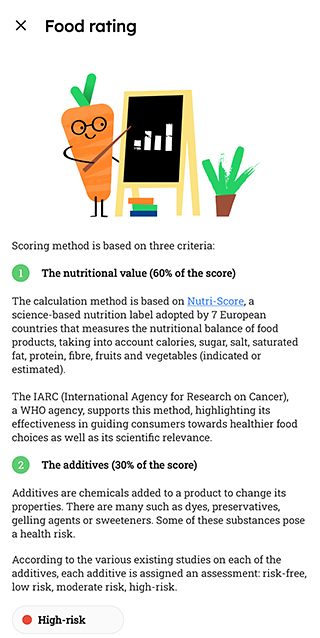
Nutritional quality carries the biggest weight. So sugar, salt, fibre and protein can strongly influence the final score. Additives can lower it, especially if they are considered potentially harmful.
If a product is certified organic, it can get a small bonus. That does not completely change a bad product into a good one, but it can slightly increase the overall rating.
The idea is to give you a quick overall picture without you having to analyse the label yourself.
How Yuka Scores Beauty Products
For cosmetics and skincare, the system works differently.
Here, the score is mainly based on the ingredients used and their potential health risks. Yuka classifies ingredients as low risk, moderate risk or high risk, based on scientific sources and regulatory data.
If something is flagged, you can tap on the ingredient and read a short explanation of why it may be concerning.
This is actually the part of the app I find most useful. It makes it very easy to spot ingredients you might otherwise miss.
Alternatives and Extra Features
If a product scores poorly, Yuka usually suggests alternative options with better ratings.
Everything is presented in a clean and simple way, which is probably one of the reasons the app has become so popular.
My experience using a Yuka app
Scanning Cosmetics
The first product I scanned was my new face cream by Natura Siberica. I like it because it keeps my skin hydrated and has SPF20.
It scored just 14 out of 100, which honestly shocked me. I had always seen this brand as fairly “natural”, so I wasn’t expecting such a low rating.
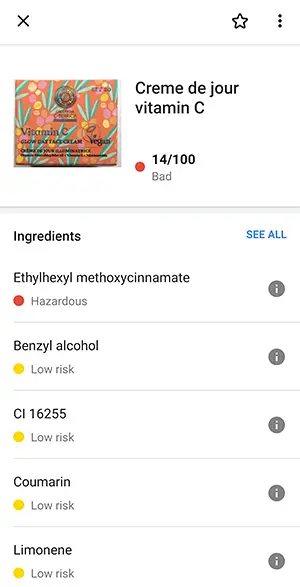
Yuka flagged one ingredient: ethylhexyl methoxycinnamate (also known as octinoxate), a UV filter linked to potential health and environmental concerns. It is allowed in the EU within certain limits, but it has been restricted in places like Hawaii due to concerns about marine life. The app explains that it may act as an endocrine disruptor (meaning it could interfere with hormones) and may cause irritation.
I was already familiar with the name octinoxate, but I didn’t recognise ethylhexyl methoxycinnamate on the label. That’s exactly where the app was helpful. It connected the two names and made it clear what I was actually looking at.
From what I’ve seen, the ingredient explanations appear accurate and based on recognised sources. That said, I still think it’s important to use your own judgement too.
One thing I found slightly disappointing is that the app did not suggest an alternative cream in this case. So if you want to switch, you may still need to do some searching yourself.
I then scanned a vitamin C eye cream from the same brand and it scored 72 out of 100, which was reassuring.
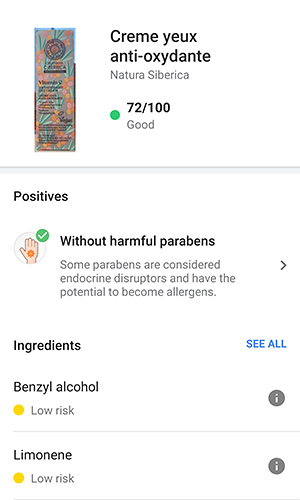
Overall, I genuinely find Yuka very helpful for cosmetics. It makes it easier to spot ingredients that would otherwise require proper research.
Scanning Food Products with Yuka
When it comes to food, my experience has been more mixed.
I started with Weetabix, which my toddler eats for breakfast a few times a week. I’ve already done the research for this one and knew it was pretty healthy, especially because it’s low in sugar. Yuka gave it 90 out of 100, which simply confirmed it’s a solid breakfast option.
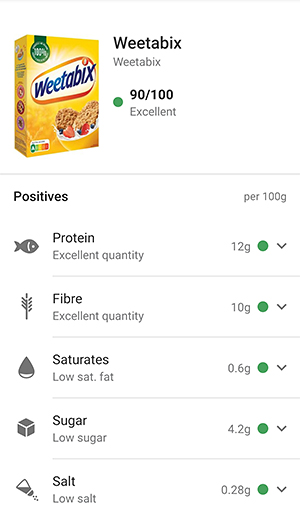
I also scanned some multigrain flakes that I consider low in sugar. They scored 84 out of 100, which again felt reassuring.
The app scored Lidl’s chickpeas 75 out of 100, and even simple foods like spaghetti. Cheese spread, on the other hand, scored poorly, which wasn’t surprising.
But then I scanned organic feta cheese, and this is where things got more interesting. It received a “Poor” rating mainly because it is high in saturated fat and salt.
Technically that’s true. But does that mean you should avoid feta completely? I don’t think so.
Feta is also high in protein and, eaten in moderation, can absolutely be part of a balanced diet. A small portion in a salad is not the same as eating half a block in one sitting.
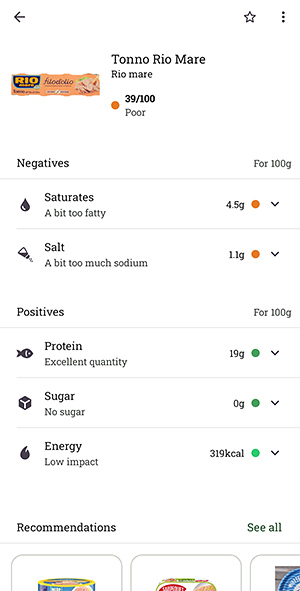
The same thing happened with canned tuna in olive oil (Rio Mare, which I personally love). It also received a poor rating because of the oil and salt content. But olive oil is not the same as refined seed oils, and I usually pour most of it out anyway. Again, context matters.
Another thing I noticed is that some products rated as “Good” still contained ingredients like sunflower oil. Yuka did not necessarily flag it as problematic, yet it’s an inflammatory oil that many people prefer to limit. A product can look healthy in the app and still be ultra-processed.
Not everything I scanned was in the database either. Some products simply didn’t show up at all.
The app is very easy to use and the layout is clean and intuitive. But this is also where I started noticing its limitations, especially when it comes to portion sizes, processing level and ingredient quality beyond additives.
Some of these limitations are worth looking at more closely.
Pros and cons of the Yuka app
After using Yuka to scan a wide range of food and beauty products, here’s what I genuinely see as the main pros and cons.
Pros:
- Free to use – You don’t have to pay anything to get started.
- No ads – There are no sponsored products or annoying pop-ups.
- Independent – Yuka states it does not take money from brands, which helps keep the scores unbiased.
- Simple and intuitive – It’s very easy to use, even if you’re not particularly tech-savvy.
- Clean design – The layout is clear and not overwhelming.
- Covers both food and cosmetics – Handy if you want one app for everything.
- Very helpful for cosmetics – You can tap on flagged ingredients and get short explanations about potential risks.
- Time-Saving – It gives you a quick overview without having to analyse every label in detail.
- Privacy-focused – Your scans and data aren’t sold or shared.
- Foolproof guidance – The app gives clear instructions, so you’ll know exactly what to do from the start.
- Social Sharing – You can easily share your discoveries with friends or family.
Cons:
- Not every product is listed – Especially smaller or local brands.
- Alternatives are not always suggested – You may still need to do your own research.
- Internet required – The free version does not work offline.
- Limited languages – It only works for ingredients in English, Spanish, Italian, German, or French.
- Food ratings can be misleading – The score alone doesn’t always reflect how healthy a food really is, especially without considering portion size and context.
- Ultra-processed products can still score well – A product may look “Good” in the app but still contain ingredients some people prefer to avoid.
Where Yuka Falls Short with Food
When it comes to food, Yuka can be helpful, but it simplifies things quite a lot.
The biggest limitation is that it doesn’t consider how much you actually eat. The app gives a single score, and if something gets a green “Excellent” rating, it’s easy to assume you can enjoy as much as you like. But that’s not how it works in real life.
Take yoghurt, for example. Half a pot might still count as a reasonable portion, but finish the whole thing and suddenly you’re getting double the sugar, turning that “green” choice into more of a red one.
The opposite can happen too.
Foods like feta or tuna in olive oil may score poorly because of fat or salt content, yet in realistic portions they can still fit perfectly well into a balanced diet.
Another limitation is that the app does not show the full ingredient list for food in the same way it does for cosmetics. You don’t always get deeper explanations, and some ingredients people prefer to limit, like certain refined oils, may not significantly affect the score.
So while Yuka is useful for quick comparisons, it doesn’t replace understanding the label yourself.
It’s a starting point, not a final verdict.
The Solution?
If you’re serious about choosing healthier foods, the Yuka app alone isn’t enough. It can point you in the right direction, but as you’ve seen, it simplifies things.
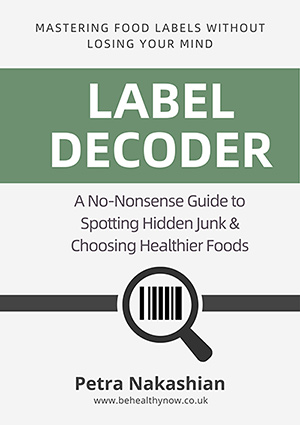
Food labels can be confusing. That’s exactly why I created Label Decoder.
It’s a practical guide that shows you how to look beyond the score. You’ll learn how to spot added sugars, understand serving sizes properly, and recognise when a product looks healthy but isn’t.
The goal isn’t to overcomplicate things. It’s to help you feel confident reading labels on your own, without relying entirely on an app.
👉 Find out more about Label Decoder here.
Paid Version of the Yuka App
Yuka also offers a paid version with a few extra features, but honestly, most people will be perfectly fine with the free one.
With the premium version, you can:
- Scan products offline
- Search the database without scanning
- Personalise preferences (for example, avoid palm oil, gluten or lactose)
- Keep an unlimited scan history
How much does the Yuka app cost?
Yuka uses an open pricing model, which means you choose how much to pay, starting from around £10 or €10 per year.
It’s a nice concept. But unless you scan products very frequently, the free version gives you more than enough.
Final Thoughts
Overall, I think Yuka is a useful tool, especially if you want quick guidance without standing in the aisle reading every label.
It’s simple, independent and particularly helpful for checking cosmetics or spotting obvious red flags.
When it comes to food, though, I see it as a starting point rather than a final answer. The score alone doesn’t always reflect portion size, processing level or ingredient quality.
If you want to make confident, informed choices, learning how to read labels yourself makes a real difference.
That’s exactly why I created Label Decoder. It helps you understand what’s behind the numbers, so you don’t have to rely entirely on an app.
👉 Find out more about Label Decoder here.
FAQs
Is the Yuka app legit?
Yes, Yuka is a legitimate app used by millions of people to scan food and cosmetic products. It does what it says it does. You scan a product and it provides a score with a breakdown.
From my own experience, the app functions properly and the information is presented clearly. That doesn’t mean it’s perfect, but it is a real and established tool.
Is Yuka app biased?
Based on what Yuka publicly states and from what I’ve seen using the app, there is no clear evidence that it is biased.
Yuka says it does not accept money from brands, which reduces the risk of commercial influence on its scores. I haven’t noticed any obvious brand favouritism either.
That said, the scoring system simplifies products, especially food. So while I wouldn’t call it biased, I would say it has limitations.
Is Yuka app reliable for cosmetics?
Yes, this is where Yuka really shines. It’s excellent at breaking down what’s inside your skincare and beauty products. You can tap on potentially risky ingredients and get a short explanation of what they are and why they might be concerning. It’s definitely helped me spot ingredients I’d otherwise miss.
Is the Yuka app reliable for food?
It is somewhat reliable, but not fully.
Yuka can be useful for quick comparisons, but it does not consider portion size, overall diet, or how processed a product is beyond certain additives. A green score does not automatically mean a food is healthy in every situation.
I see it as a helpful starting point, not something to rely on completely.
How accurate is the Yuka app?
Yuka is generally accurate in the sense that it uses recognised nutritional data and regulatory sources.
However, the score does not always reflect the full reality of a product. It does not consider portion size, overall diet, or the bigger context of how a food is eaten.
So the information can be trustworthy as a general guide, but the score alone is not a complete or final answer.
No app can replace reading the label yourself, especially when it comes to sugar, portion sizes and processed ingredients.
Is the paid version of Yuka worth it?
That depends on how often you use the app. If you scan products all the time and want features like offline use or personalised filters (for example, avoiding palm oil or gluten), then it could be worth it. But if you’re only using it occasionally, the free version gives you everything you really need.
Related:
I also tested Fooducate to see how its food grades really work. You can read my full Fooducate app review here.

Petra Nakashian (previously Kravos) has been writing about health and healthy living for over 10 years. She covers nutrition, natural health, and everyday wellness topics, with a focus on clear, practical advice you can actually use. Petra enjoys digging into health books, studies, and reputable research to check health claims, because there’s a lot of advice online that sounds convincing but isn’t accurate.